1/13/2013 Update: Now PhysicalFile property is filled and updated automatically, using T4 template. Say good-bye to issues caused by typos and copy-pasting.
Recently I had to add routing to existent ASP.NET Web Forms application. I was (and I suppose I’m still) new to this thing so I started from Walkthrough: Using ASP.NET Routing in a Web Forms Application and it seemed fine until I started coding.
The site was nothing special but approximately 50 pages. And when I started configuring all these pages it felt wrong - I was lost in all these route names, defaults and constraints. If it felt wrong, I thought, why not to try something else. I googled around and found a pretty good thing - ASP.NET FriendlyUrls. Scott Hanselman wrote about this in his Introducing ASP.NET FriendlyUrls - cleaner URLs, easier Routing, and Mobile Views for ASP.NET Web Forms post. At first glance it looked far easier and better, but I wanted to use RouteParameters for my datasource controls on pages. ASP.NET FriendlyUrls are providing only “URL segment” concept - string that could be extracted from URL (string between ‘/’ characters in URL). URL Segments could not be constrained and thus automatically validated. Also, segments could not have names, so my idea to use RouteParameter would be killed if I’d go with ASP.NET FriendlyUrls.
At the end of this little investigation I thought that it would be easier to tie together route configuration with page class via custom attribute and conventionally named properties for defaults and constraints. So every page class gets its routing configuration as follows:
The code above states that Edit page in folder Foo of my RoutingWithAttributes web application will be accessible through http://<application-url>/Foo/Edit hyperlink with optional id parameter. Default value for id parameter is empty string but it should be integer number if provided.
For me this works better, it is self describing and I’m not forced to go to some App_Start\RoutingConfig.cs file and search for it. Now how it is working under the hood? Nothing new or special - just a bit of reflection on Application_Start event. And routes are still registered with RouteCollection.MapPageRoutemethod.
protectedvoidApplication_Start(objectsender,EventArgse){RouteConfig.RegisterRoutes(RouteTable.Routes);}publicclassRouteConfig{publicstaticvoidRegisterRoutes(RouteCollectionroutes){varmappedPages=Assembly.GetAssembly(typeof(RouteConfig)).GetTypes().AsEnumerable().Where(type=>type.GetCustomAttributes(typeof(MapToRouteAttribute),false).Length==1);foreach(varpageTypeinmappedPages){vardefaultsProperty=pageType.GetProperty("Defaults");vardefaults=defaultsProperty!=null?(RouteValueDictionary)defaultsProperty.GetValue(null,null):null;varconstraintsProperty=pageType.GetProperty("Constraints");varconstraints=constraintsProperty!=null?(RouteValueDictionary)constraintsProperty.GetValue(null,null):null;vardataTokensProperty=pageType.GetProperty("DataTokens");vardataTokens=dataTokensProperty!=null?(RouteValueDictionary)dataTokensProperty.GetValue(null,null):null;varrouteAttribute=(MapToRouteAttribute)pageType.GetCustomAttributes(typeof(MapToRouteAttribute),false)[0];if(string.IsNullOrEmpty(routeAttribute.RouteUrl))thrownewNullReferenceException("RouteUrl property cannot be null");if(string.IsNullOrEmpty(routeAttribute.PhysicalFile))thrownewNullReferenceException("PhysicalFile property cannot be null");if(!VirtualPathUtility.IsAppRelative(routeAttribute.PhysicalFile))thrownewArgumentException("Property should be application relative URL","PhysicalFile");routes.MapPageRoute(pageType.FullName,routeAttribute.RouteUrl,routeAttribute.PhysicalFile,true,defaults,constraints,dataTokens);}}}
Route name is equal to the FullName property of page type. Since Type.FullName includes both namespace and class name it guarantees route name uniqueness across the application.
To utilize route links generation I had to create two extension methods for Page class. These methods are just wrappers for Page.GetRouteUrl method.
Almost a year ago when I started using Instapaper I realized that it would be great to grab all articles that were collected through the week, convert them to EPUB format and send electronic book to my e-book reader device. The only problem was in my device - Lbook V5. Yes, it is totally outdated and old comparing to Kindle devices. It supports EPUB but does not have access to the Internet, so Instapaper “download” feature doesn’t work for me.

A few month ago I found Calibre - free and open source e-book library management application. It helped me to organize and manage all my electronic library and I’m totally happy with it. Calibre has everything that could be possibly needed - scheduler support, custom news source with interactive setup and converters to various e-book formats. But what most interesting and important Calibre has command line ebook-convert.exe utility which could be driven by recipe files. Recipes in Calibre are just Python scripts (with a bits of custom logic if it is needed to parse some specific news source).
Below is simple Calibre recipe:
1234567
classAdvancedUserRecipe1352822143(BasicNewsRecipe):title=u'Custom News Source'oldest_article=7max_articles_per_feed=100auto_cleanup=Truefeeds=[(u'The title of the feed',u'http://somesite.com/feed')]
This defines RSS feed source at http://somesite.com/feed and declares that there should be no more than 100 articles not older than 7 days. If we’ll use it with ebook-convert utility, it will automatically fetch news from specified feed and will generate e-book file. The command line to generate book is following:
When input_file parameter is recipe ebook-convert runs it and then produces e-book in specified by output_file parameter format. Recipe should populate feeds dictionary so ebook-convert will know what XML feeds should be processed. Options could accept two parameters - username and password (correct me if I’m wrong but I didn’t found any information about possibility to use other/custom parameters). That was a brief introduction to Calibre recipe files. Now here is the problem.
Calibre has built in Instapaper recipe. This recipe was created by Stanislav Khromov with Jim Ramsay. Recipe has two versions - stable (it is part of current Calibre release) and development version, both could be found on BitBucket.
The development version of Instapaper recipe does almost what I want, but I needed to extend its functionality including:
Grab articles from all pages inside one directory (yes, sometimes it happens, when I’m not reading Instapaper articles for a few weeks).
Merge articles from certain directories into one book.
Archive all items in directories. This actually implemented in development version, but instead of using “Archive All…” form recipe emulates clicking on “Move to Archive” button which takes a lot of time to process all items.
At first I decided to extend development version of the mentioned above recipe but after I wasted an hour trying to beat the Python I realized that I can write command line utility in .NET (where I feel myself very comfortable) which will do whatever I want and I will save a ton of time (I’m definitely not going to learn Python just to change/fix one Calibre recipe :)). So here is InstaFeed - little command line utility that can enumerate names of Instapaper directories, generate single RSS feed for specified list of directories and archive them all at once. It uses two awesome open-source projects - Html Agility Pack and Command Line Parser Library.
Note: While this utility parses Instapaper HTML and produces RSS you can probably bypass “RSS limits” of Instapaper non-subscription accounts. But I encourage you to support this service. Cheating is not good at all, please respect Marco Arment’s work and efforts he put in this awesome service.
Having the command line utility that produces locally stored RSS feeds the only thing that remains is to create simple Calibre Recipe for ebook-convert utility. The recipe should be parameterized with path to RSS feed generated by InstaFeed. Here is the code:
1234567891011
classLocalRssFeed(BasicNewsRecipe):title=u'local_rss_feed'oldest_article=365max_articles_per_feed=100auto_cleanup=Truefeeds=Nonedefget_feeds(self):# little hack that allows passing path to local RSS feed as a parameter via command lineself.feeds=[u'Instapaper Unread','file:///'+self.username]returnself.feeds
All custom recipes should be stored within Calibre Settings\custom_recipes folder.
Note: Everything in this post applies to Portable 0.8.65.0 version of Calibre for Microsoft Windows. I have no idea whether it will work for other versions or installation variants.
Below is sources for batch file that produces RSS feed from Read Later Instapaper directory and then generates e-book in EPUB format at C:\Temp. I run this batch weekly via Windows Task Scheduler.
1234567891011121314151617
@echooffsetlocal EnableDelayedExpansion
setlocal EnableExtensions
:: change path to your calibre and instafeed executablesset_instafeeddir=F:\util\instafeed\
set_calibredir=F:\util\Calibre Portable\
:: set output directory and naming convention heresetfilename=C:\Temp\[%date:/=%]_instapaper_unread_articlessetrssfile=%filename%.xml
setebookfile=%filename%.epub
%_instafeeddir%instafeed.exe -c rss -u <instapaper_username> -p <instapaper password> -d "Read Later" -o "%rssfile%"%_calibredir%\Calibre\ebook-convert.exe "%_calibredir%\Calibre Settings\custom_recipes\local_rss_feed.recipe""%ebookfile%" --username="%rssfile%"endlocal
I had fun writing InstaFeed and digging in Calibre recipes and hope that someone will benefit from my experience. What else could be said? Read with convenience and have fun!
Today, I was working on JavaScript implementation of validation routine for PhoneAttribute in context of my hobby project DAValidation. Examining the sources of .NET 4.5 showed that the validation is done via regular expression:
Finally, flavors like JavaScript, Ruby and Tcl do not support lookbehind at all, even though they do support lookahead.
This lookbehind is used to match the “+” sign at the beginning of string, i. e. check the existence of the prefix. To make this work in JavaScript pattern should be reversed and lookbehind assertion should be replaced with lookahead (replace prefix check to suffix). And that’s it! The resulting pattern is:
<html><head><title>Phone Number RegExp Test Page</title></head><body><script>functionvalidateInput(){varphoneRegex=newRegExp("^(\\d+\\s?(x|\\.txe?)\\s?)?((\\)(\\d+[\\s\\-\\.]?)?\\d+\\(|\\d+)[\\s\\-\\.]?)*(\\)([\\s\\-\\.]?\\d+)?\\d+\\+?\\((?!\\+.*)|\\d+)(\\s?\\+)?$","i");varinput=document.getElementById("tbPhone");varvalue=input.value.split("").reverse().join("");alert(phoneRegex.test(value));}</script><inputtype="text"id="tbPhone"/><buttononclick="javascript:testPhone()">Validate</button></body></html>
While working on pattern reversing I was using my favorite regular expressions building and testing tool Expresso. Also, a great article of Steven Levithan Mimicking Lookbehind in JavaScript helped to look deeper and actually find the right solution of the problem.
Every time, when we speaking about data driven web applications there is a task of providing data filtering feature or configurable filters with ability to save the search criteria individually for each user. The most convenient filtering experience I have ever encountered were the bug tracking systems. Fast and simple. To get the idea of what I’m talking about just look at Redmine Issues page.
Can we implement something similar with pure ASP.NET, particularly with ASP.NET Dynamic Data? Why Dynamic Data? Because of its focus on metadata which is set by attributes from DataAnnotations namespace and convention over configuration approach for building data driven applications. Its simple and convenient, and does not take much efforts to extend it.
Until .NET 4.5 there were no extension points where we could retake control over filter templates creation. And surprisingly, I found that interface IFilterExpressionProvider.aspx) became public in .NET 4.5. So now we can extend Dynamic Data filtering mechanism.
ASP.NET Dynamic Data QueryableFilterRepeater
For the jump start lets remind how List PageTemplate in Dynamic Data looks like:
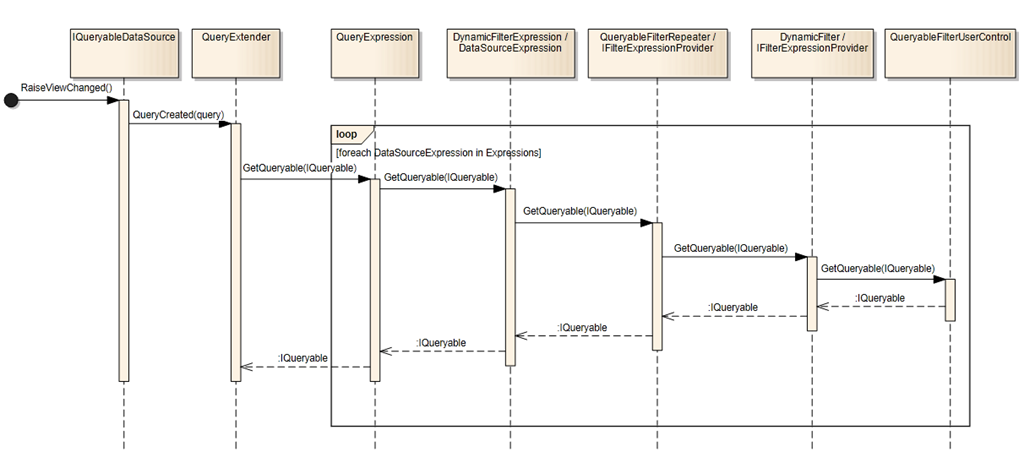
The purpose of QueryableFilterRepeater is to generate set of filters for a set of columns. It should contain DynamicFilter control which is the actual placeholder for a FilterTemplate control. QueryableFilterRepeater implements IFilterExpressionProvider interface that is supported by QueryExtender via DynamicFilterExpression control.
The complete call sequence is represented on diagram below.
Building Configurable Alternative to QueryableFilterRepeater
As QueryableFilterRepeater is creating filters automatically, the only thing we can do is to hide DynamicFilter on client- or on server-side. To my mind it is not good idea, so a custom implementation of IFilterExpressionProvider is needed. It should support the same item template model as in QueryableFilterRepeater but with ability to add/remove filter controls between postbacks.
The only disappointing thing is the content generation of DynamicFilter which is done on Page.InitComplete event.
Oleg Sych tried to change the situation, but his suggestion is closed now and seems nothing will be changed. I just reposted his suggestion on visualstudio.uservoice.com in hope that this time, we will succeed.
To make things working, DynamicFilter control should initialize itself via EnsureInit method which is generally speaking responsible for FitlerTempate lookup and loading. In other words to force the DynamicFilter to generate its content this method should be called. The only way to do it is to use reflection, since EnsureInit is private.
privatestaticreadonlyMethodInfoDynamicFilterEnsureInit;staticDynamicFilterRepeater(){DynamicFilterEnsureInit=typeof(DynamicFilter).GetMethod("EnsureInit",BindingFlags.NonPublic|BindingFlags.Instance);}privatevoidAddFilterControls(IEnumerable<string>columnNames){foreach(MetaColumncolumninGetFilteredMetaColumns(columnNames)){DynamicFilterRepeaterItemitem=newDynamicFilterRepeaterItem{DataItemIndex=itemIndex,DisplayIndex=itemIndex};itemIndex++;ItemTemplate.InstantiateIn(item);Controls.Add(item);DynamicFilterfilter=item.FindControl(DynamicFilterContainerId)asDynamicFilter;if(filter==null){thrownewInvalidOperationException(String.Format(CultureInfo.CurrentCulture,"FilterRepeater '{0}' does not contain a control of type '{1}' with ID '{2}' in its item templates",ID,typeof(QueryableFilterUserControl).FullName,DynamicFilterContainerId));}filter.DataField=column.Name;item.DataItem=column;item.DataBind();item.DataItem=null;filters.Add(filter);}filters.ForEach(f=>DynamicFilterEnsureInit.Invoke(f,newobject[]{dataSource}));}privateIEnumerableGetFilteredMetaColumns(IEnumerablefilterColumns){returnMetaTable.GetFilteredColumns().Where(column=>filterColumns.Contains(column.Name)).OrderBy(column=>column.Name);}privateclassDynamicFilterRepeaterItem:Control,IDataItemContainer{publicobjectDataItem{get;internalset;}publicintDataItemIndex{get;internalset;}publicintDisplayIndex{get;internalset;}}
Another problem that should be solved - filter controls instantiation. As it was pointed before, all things in Dynamic Data that are connected with filtering are initialized at Page.InitCompleted event. And if you want your dynamic filters to work, they should be instantiated before or at InitComplete event. So far I see only one way to solve this - method AddFilterControls should be called twice, first time to instantiate filter controls that were present on the page (InitComplete event) and second time for newly added columns that are to be filtered (LoadComplete event).
DynamicFilterRepeater is only a part of more general component though. Everything it does is rendering of filter controls and providing of filter expression. But to start working, DynamicFilterRepeater needs two things - IQueryableDataSource and list of columns to be filtered. Since filtering across the website should be consistent and unified it would be good to encapsulate DynamicFilterRepeater in UserControl which will serve as HTML layout and a glue between page (with IQueryableDataSource, QueryExtender and data source bound control) and DynamicFilterRepeater. In my example I chose GridView.
Remember I have mentioned about two-stage filter controls instantiation and a storage for list of filtered columns? Yes, this user control is a place where list of filtered columns could be stored. To get list of filtered columns before Page.InitComplete event I’m using a little trick - the hidden input field serves as a storage for filtered columns list. Enforcing hidden input to have its ID generated on server makes it possible to retrieve value directly from Page.Form collection at any stage of page lifecycle.
publicpartialclassDynamicFilterForm:UserControl{publicDynamicFilterRepeaterFilterRepeater;publicTypeFitlerType{get;set;} [IDReferenceProperty(typeof(GridView))]publicstringGridViewID{get;set;} [IDReferenceProperty(typeof(QueryExtender))]publicstringQueryExtenderID{get;set;}privateMetaTableMetaTable{get;set;}privateGridViewGridView{get;set;}protectedQueryExtenderGridQueryExtender{get;set;}protectedoverridevoidOnInit(EventArgse){base.OnInit(e);MetaTable=MetaTable.CreateTable(FitlerType);GridQueryExtender=this.FindChildControl<QueryExtender>(QueryExtenderID);GridView=this.FindChildControl<GridView>(GridViewID);GridView.SetMetaTable(MetaTable);// Tricky thing to retrieve list of filter columns directly from hidden fieldif(!string.IsNullOrEmpty(Request.Form[FilterColumns.UniqueID]))FilterRepeater.FilterColumns.AddRange(Request.Form[FilterColumns.UniqueID].Split(','));((IFilterExpressionProvider)FilterRepeater).Initialize(GridQueryExtender.DataSource);}protectedoverridevoidOnPreRender(EventArgse){FilterColumns.Value=string.Join(",",FilterRepeater.FilterColumns);base.OnPreRender(e);}// event handlers ommited}
Conclusions
While this solution works, I’m a bit concerned about it. Existent infrastructure was in my way all the time I experimented with IFilterExpressionProvider, and I had to look deep inside the mechanisms of Dynamic Data to understand and find ways to come round its restrictions. And this leads me to only one conclusion - Dynamic Data was not designed to provide configurable filtering. So my answer on question about possibility of configurable filtering experience implementation with Dynamic Data is yes, but be careful what you wish for, since it was not designed for such kind of scenarios.
Here I did not mentioned how to save filters, but it is pretty simple, and all we need is to save somewhere associative array of “column-value” for a specific page. Complete source code is available on GitHub and you will need Visual Studio 11 Beta with localdb setup to run sample project.
I would gladly accept criticism, ideas or just thoughts on this particular scenario. Share, do coding and have fun!
There is a whitepaper about new features of ASP.NET 4.5, dozens of blog posts, videos from conferences, some tutorials and MSDN.aspx) topic describing overall changes. But why there are no reports about what types were actually added in .NET 4.5 Beta? Where are lists of “new types added to assembly N” or “types that became public in assembly N”? I understand that these lists are not very interesting and that it is more convenient to read descriptions of the new features. Nobody cares about details until they start working against you. And this is normal, right and ok, but now I have some free time and I want to share info about new types that were added or became public in .NET 4.5 comparing to .NET 4.0.
It is pretty simple to do compiled assemblies diff if you have NDepend or similar tool, but what if you (like me) have no license? I started thinking to enumerate public types via reflection, but soon recalled that .NET 4.5 beta replaces assemblies of .NET 4.0 during installation and Assembly.LoadFrom will not work. To overcome this I decided to parse and compare XML documentation that comes along with all .NET assemblies. Simple as that, every public type is documented and difference between old and new version of documentation will give me at least names of types.
Ok, where to get xml documentation files for .NET 4.0? Binaries with xml docs of .NET 4.0 and 4.5 are located in :\Program Files[(x86)]\Reference Assemblies\Microsoft\Framework.NETFramework.
What I wanted is to get some statistics. There are 969 new public types in .NET 4.5. But it does not mean that those are completely new things, because it is not, it means that out of the box .NET 4.5 Beta has +969 new types comparing to .NET 4.0 and now there are totally 14971 public and documented types in .NET 4.5. Almost 15K only public types - that’s incredibly huge number.
Most of new types are located in System.IdentityModel, System.Web and System.Windows.Controls.Ribbon assemblies. Taking into account that System.IdentityModel is providing authentication and authorization features and System.Windows.Controls.Ribbon is UI library allowing use of Microsoft Ribbon for WPF, we can make a conclusion that vast amount of new changes is connected with web.
But the most interesting thing was to examine minor changes and see that something new and really useful has been added. And I encourage you to look over list of new classes and I bet you will find something interesting.
LINQPad script with which I did the documentation comparison is listed below. Excel report with some diagrams is also available online.
voidMain(){// in case of non 64 bit system change "Program Files (x86)" to "Program Files"stringnet40Dir=@"C:\Program Files (x86)\Reference Assemblies\Microsoft\Framework\.NETFramework\v4.0\";stringnet45Dir=@"C:\Program Files (x86)\Reference Assemblies\Microsoft\Framework\.NETFramework\v4.5\";// 1. Get all types from all xml doc files in both directories that are containing .NET assemblies and group them by assembliesvarnet40Grouped=GetPublicTypesByAssembly(net40Dir);varnet45Grouped=GetPublicTypesByAssembly(net45Dir);// 2. Get list of newly added assembliesvarnewAssemblies=net45Grouped.Where(kvp=>!net40Grouped.ContainsKey(kvp.Key)).ToList();Console.WriteLine("New assemblies in .NET 4.5 Beta: (total count - {0})",newAssemblies.Count);newAssemblies.ForEach(kvp=>Console.WriteLine(kvp.Key));Console.WriteLine();// 3. Get all assemblies that are not present in .NET 4.5 betavarnonExistentAssemblies=net40Grouped.Where(kvp=>!net45Grouped.ContainsKey(kvp.Key)).ToList();Console.WriteLine("Assemblies that are not present in .NET 4.5 Beta folder comparing to .NET 4.0: (total count - {0})",nonExistentAssemblies.Count);nonExistentAssemblies.ForEach(kvp=>Console.WriteLine(kvp.Key));Console.WriteLine();// 4. Get all new types in .NET 4.0 and .NET 4.5 Beta assembliesvarnet40=net40Grouped.SelectMany(kvp=>kvp.Value).ToList();varnet45=net45Grouped.SelectMany(kvp=>kvp.Value).ToList();varnewTypes=net45.Except(net40).ToList();Console.WriteLine("Types count in .NET 4.0:|{0}",net40.Count);Console.WriteLine("Types count in .NET 4.5 Beta:|{0}",net45.Count);Console.WriteLine("New types count in .NET 4.5 Beta comparing to .NET 4.0:|{0}",newTypes.Count);// 5. Get assemblies that are containing new typesvarassembliesWithChanges=net45Grouped.Where(kvp=>newTypes.Any(type=>kvp.Value.ContainsValue(type.Value)));// 6. Remove existent in .NET 4.0 types from assembliesWithChanges to get clear lists of new types grouped by assembliesvarnewTypesGrouped=assembliesWithChanges.ToDictionary(typesGroup=>typesGroup.Key,typesGroup=>typesGroup.Value.Except(net40).Select(kvp=>kvp.Value).ToList());Console.WriteLine("New types by assembly:");foreach(varassemblyWithNewTypesinnewTypesGrouped){Console.WriteLine("{0}|{1}",assemblyWithNewTypes.Key,assemblyWithNewTypes.Value.Count);foreach(vartypeNameinassemblyWithNewTypes.Value){Console.WriteLine(typeName);}Console.WriteLine();}}Dictionary<string,Dictionary<int,string>>GetPublicTypesByAssembly(stringxmlDocsDirectory){string[]xmlDocFiles=Directory.GetFiles(xmlDocsDirectory,"*.xml");varresult=newDictionary<string,Dictionary<int,string>>();foreach(varxmlDocinxmlDocFiles){varroot=XDocument.Load(xmlDoc).Root;if(root==null)continue;varmembers=root.Element("members");if(members==null)continue;vartypesByAssembly=members.Elements("member").Where(e=>e.Attribute("name").Value.StartsWith("T:")).ToDictionary(e=>e.Attribute("name").Value.GetHashCode(),e=>e.Attribute("name").Value.Substring(2)/* T: */);result.Add(Path.GetFileNameWithoutExtension(xmlDoc)+".dll",typesByAssembly);}returnresult;}
And at the end here are links that will help a bit to embrace the changes of .NET 4.5 Beta:
UPDATE: igoogle_themes.zip archive is no longer available through Wayback Machine since it is pointing to mattberseth2.com which is not working. However archive could be found on my SkyDrive.
Today when I had to find a theme for ASP.NET GridView the first resource I found in my memory was Matt Berseth’s blog (Google also found something for me but I’m convinced that “favorites list” in my memory is a much better and reliable source). Matt had great examples of AJAX control extenders and some other things connected with styling of ASP.NET controls on his site. But while domain still belongs to Matt Berseth, the site is currently down and not available.
Browse through over 150 billion web pages archived from 1996 to a few months ago.
In fact it never helped me, but I wanted to get rarely visited pages or downloads of a big size so it is nothing to complain. And at this time I was interested in recovery of popular resource and to my relief the page was crawled 20 times from the 3rd of November, 2007. And sample project download was also available! So it took me something near to 20 minutes to get what I wanted and this is nothing comparing to the efforts needed to create my own CSS for a GridView.
When I had worked on ASP.NET MVC project I really liked how input is validated with Data Annotations attributes. And when I had to return to the Web Forms, and write a simple form with some validation, I was wondering how I lived before with standard validator controls. For me, it was never convenient, when I had to write an enormous amount of server tags just to state that “this is required field which accepts only numbers in specified range…”. Yes, there is nothing terrible in declaration of two or three validation controls instead of one. But, if I had a choice, I would like to write only one validator per field and keep all input validation logic as far as I can from the UI markup. And being a developer the code-only approach is most natural for me.
System.ComponentModel.DataAnnotations namespace was introduced in .NET 3.5, and now its classes are supported by wide range of technologies like WPF, Silverlight, RIA Services, ASP.NET MVC, ASP.NET Dynamic Data but not in Web Forms. I thought that someone had already implemented ready-to-use Validator Control with client-side validation, but after searching the Web and most popular open source hosting services I found nothing. Ok, not nothing, but implementations what I have found lacked client-side validation and had some other issues. So I decided to write my own Data Annotations Validator that will also support client-side validation.
Creating Data Annotations Validator Control
Server-Side
As I wanted to achieve compatibility with existing validation controls (new validator is not a replacement for an old ones, it is just an addition to them), it was decided to inherit from BaseValidator. This class does all necessary initialization on both client- and server-sides and exposes all necessary methods for overriding.
First of all EvaluateIsValid method of BaseValidator should be overridden.
123456789101112131415161718192021
protectedoverrideboolEvaluateIsValid(){objectvalue=GetControlValidationValue(ControlToValidate);foreach(ValidationAttributevalidationAttributeinValidationAttributes){// Here, we will try to convert value to type specified on RangeAttibute.// RangeAttribute.OperandType should be either IConvertible or of built in primitive typesvarrangeAttibute=validationAttributeasRangeAttribute;if(rangeAttibute!=null){value=Convert.ChangeType(value,rangeAttibute.OperandType);}if(validationAttribute.IsValid(value))continue;ErrorMessage=validationAttribute.FormatErrorMessage(DisplayName);returnfalse;}returntrue;}
The only interesting aspect of this method is line 16. I’m using FormatErrorMessage method of ValidationAttribute to use all the goodness like support of resources and proper default error message formatting. So, now there is no need to invent something with error messages.
Next thing to deal with is where to get ValidationAttributes collection. There is System.Web.DynamicData.MetaTable class that could be used to retrieve attributes. It was introduced in the first versions of ASP.NET Dynamic Data and now in 4.0 version of Dynamic Data, MetaTable has a static method CreateTable which accepts Type as input parameter. Why using MetaTable, why not retrieve attributes of Type directly from PropertyInfo for specified property name? Because MetaTable also supports retrieving of custom attributes that are applied to property through MetadataTypeAttribute and merges attributes applied to property both in metadata class and entity class. And again, why inventing something new when everything that is needed is right here?
Now let’s look a bit into the future - if we place ObjectType property into DataAnnotationsValidator, it means that we should specify this property for every validator control on page. This is redundancy and leads to copy-pasting which is not acceptable. Lets step aside and create MetadataSource control that will act like metadata provider for validators on page.
Here I also thought about DisplayAttribute which is used to format default error message. Now how ObjectType of MetadataSouce should be specified? Well, we can do it programmatically on Page_Load or do it.. programmatically with CodeExpressionBuilder to keep all control setup in one place.
This is all what was needed to provide server-side validation.
Client-Side
First of all, lets check what standard validator controls could be replaced with Data Annotations attributes.
Data Annotations Attribute
Standard Validator Control
RequiredAttribute
RequiredFieldValidator
StringLengthAttribute
-
RegularExpressionAttribute
RegularExpressionValidator
-
CompareValidator
RangeAttribute
RangeValidator
I have no ideas how to replace CompareValidator and I don’t think it is so critical and necessary to think on it. Time to look how standard validator controls are working on the client side.
Every validator that works on the client side should override AddAttributesToRender method of BaseValidator class. This method adds some fields to resulting javascript object. For example, RequiredFieldValidator adds evaluationfunction and initialvalue fields.
After examining source code of standard validator controls I found that every control sets evaluationfunction field that states a name for a javascript function that actually performs validation on the client-side. RequiredFieldValidator evaluation function is represented below.
The val parameter is a validator object that was initialized with all the fields that were set in the AddAttributesToRender method. Plain and simple, if you need to supply your validator on client-side with some information override AddAttributesToRender and add what you want. To replace standard validators DataAnnotationsValidator is doing a little trick - it adds all standard evaluationfunction names, error messages and all necessary fields that are used by standard validation functions. Evaluation function of DataAnnotationsValidator:
The only thing that remains is to get list of fields and values that are needed for validation functions. Every Data Annotation validation attribute will have an Adapter class that stores an array of ClientValidationRule classes. ClientValidationRule is just a container for storing javascript object field names and evaluationfunction.
privatestaticreadonlyDictionary<Type,Func<ValidationAttribute,string,ValidationAttributeAdapter>>PredefinedCreators=newDictionary<Type,Func<ValidationAttribute,string,ValidationAttributeAdapter>>{{typeof(RangeAttribute),(attribute,displayName)=>newRangeAttributeAdapter(attributeasRangeAttribute,displayName)},{typeof(RegularExpressionAttribute),(attribute,displayName)=>newRegularExpressionAttributeAdapter(attributeasRegularExpressionAttribute,displayName)},{typeof(RequiredAttribute),(attribute,displayName)=>newRequiredAttributeAdapter(attributeasRequiredAttribute,displayName)},{typeof(StringLengthAttribute),(attribute,displayName)=>newStringLengthAttributeAdapter(attributeasStringLengthAttribute,displayName)}};publicstaticValidationAttributeAdapterCreate(ValidationAttributeattribute,stringdisplayName){Debug.Assert(attribute!=null,"attribute parameter must not be null");Debug.Assert(!string.IsNullOrWhiteSpace(displayName),"displayName parameter must not be null, empty or whitespace string");// Added suport for ValidationAttribute subclassing. See http://davalidation.codeplex.com/workitem/695varbaseType=attribute.GetType();Func<ValidationAttribute,string,ValidationAttributeAdapter>predefinedCreator;do{if(!PredefinedCreators.TryGetValue(baseType,outpredefinedCreator))baseType=baseType.BaseType;}while(predefinedCreator==null&&baseType!=null&&baseType!=typeof(Attribute));returnpredefinedCreator!=null?predefinedCreator(attribute,displayName):newValidationAttributeAdapter(attribute,displayName);}
As I said previously, idea was borrowed directly from ASP.NET MVC, so if you are familiar with its validation mechanisms you don’t need to learn how it works here. Approach here is almost identical to ASP.NET MVC which was described well by Brad Wilson. As in ASP.NET MVC DAValidation.IClientValidatable interface exposes an extension point and we can now create a custom validation attribute, implement IClientValidatable interface, write validation function or mix existing ones and get both server- and client-side validation. There is a great set of validation attributes - Data Annotations Extensions created by Scott Kirkland so it is only client function must be changed in order to use them with DataAnnotationsValidator.
My name is Alexander Manekovskiy. I’m .NET developer currently working in BIT, where my main duties are to develop and maintain couple of .NET based solutions and sometimes represent company on regional IT conferences and meetings. Also I’m working as a trainer at ITStep.
I work primarily on the Microsoft .NET technologies stack and my experience is mainly connected with different intranet web-based applications which were tightly integrated with various 3rd party solutions and products such as Microsoft Office, Adobe InDesign, different Storefronts, CRM systems, etc.
I like trying new things and I’m always open to new interesting ideas and concepts. And in this blog I’m going to write about practices, tools and ideas that in my mind could be useful or just interesting for .NET developer. The second idea of running this blog is to have an online 24/7 memory stick.
I’m always open to cooperation and you can freely contact me by email or skype: